Magnesium
2 capsules · 400 mg
Hold the button and speak
Or double tap and the recording runs hands-free. While you talk, cards appear — one for each thing you named.
Your entries stay on your phone
RecTake listens while you say what you took — and turns it into entries. With the time, with the amount, without a form. Supplements, medication, food, mood.
Coming to the App Store and Google Play. One message when it's there — nothing else.
For iPhone and Android · English and German
How it works
Three steps, and none of them is a form. The last one is: do nothing.
Or double tap and the recording runs hands-free. While you talk, cards appear — one for each thing you named.
Swipe right for yes. Swipe left for no. Then you correct it, again by voice — “not 400, make it 200”.
Everything is saved anyway. An entry is never quietly lost here, not even when a call comes in mid-recording.
Try it
Tap one of the four sentences. What appears is what the app would write.
A simulation in your browser. Nothing is recorded and nothing is sent — this page has nowhere to send anything to.
Nothing said yet.
The cards your sentence would produce appear here.
What RecTake does
Record, look back, find again, teach. Anything else would only have made the way to an entry longer.
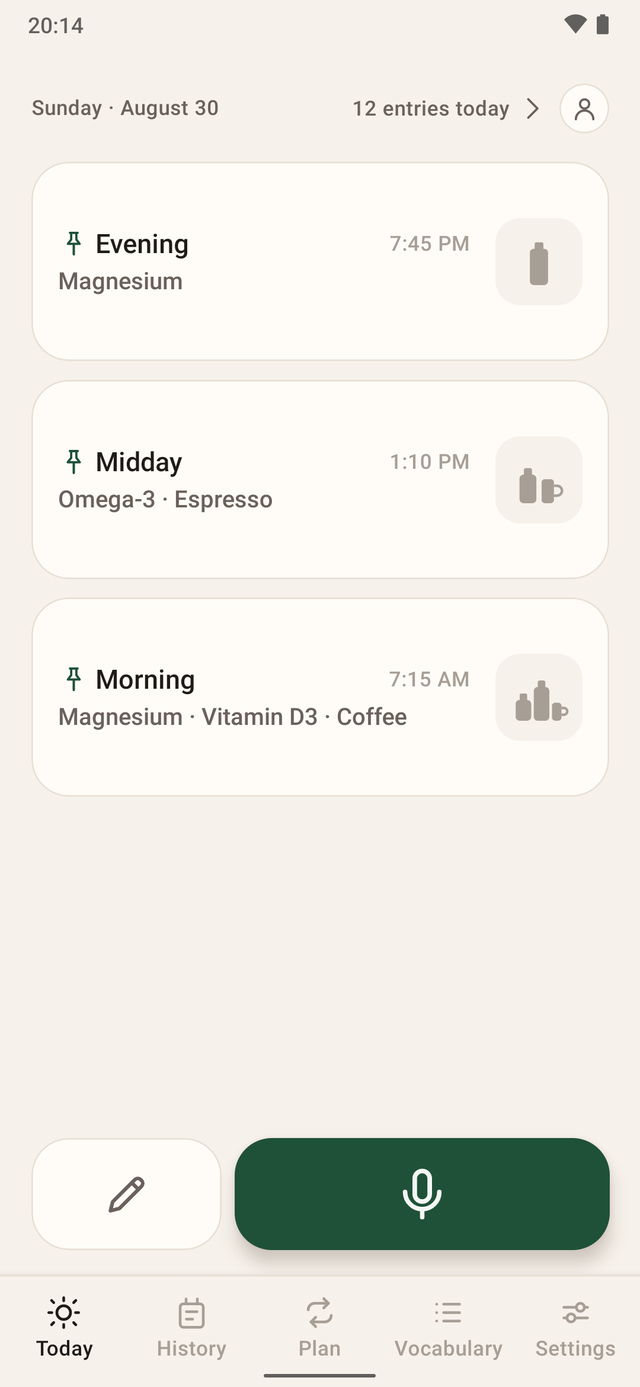
Today
The home screen has exactly one big job: record. Above it sit your routines — groups of things you take together. One tap logs them all.
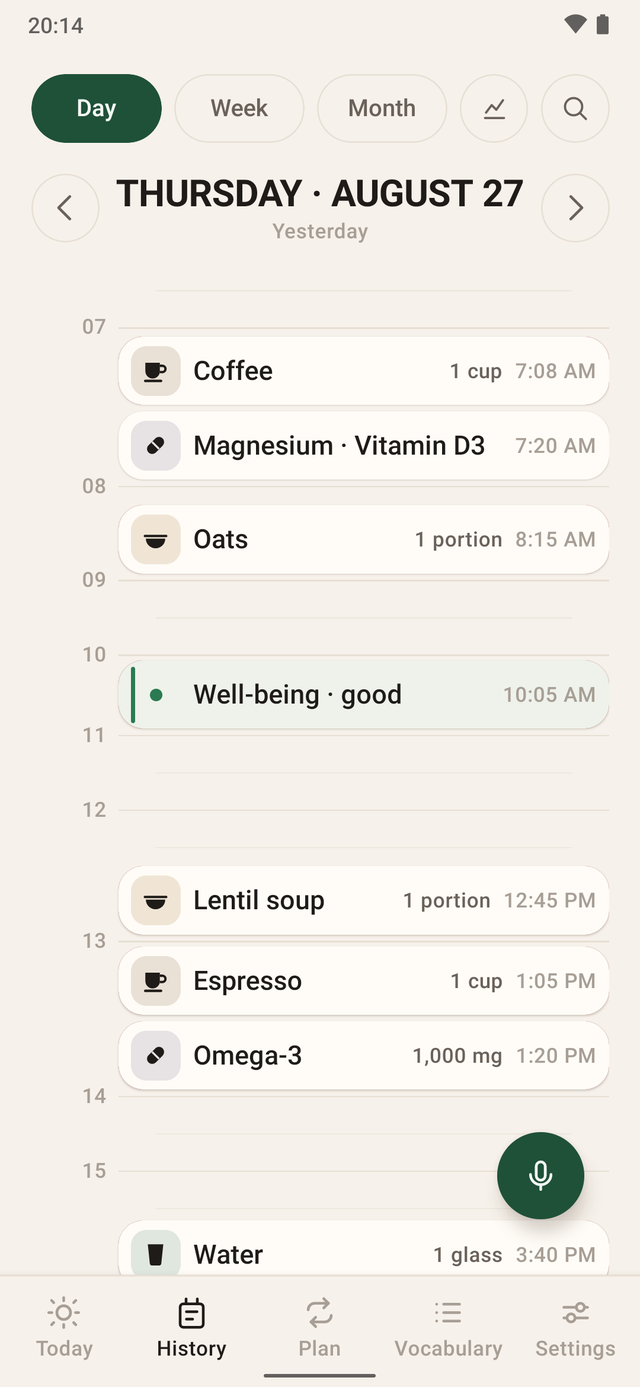
History · Day
Every entry sits where it happened. Empty hours are folded away until you want to see them — so a quiet morning does not look like a gap.
History · Month
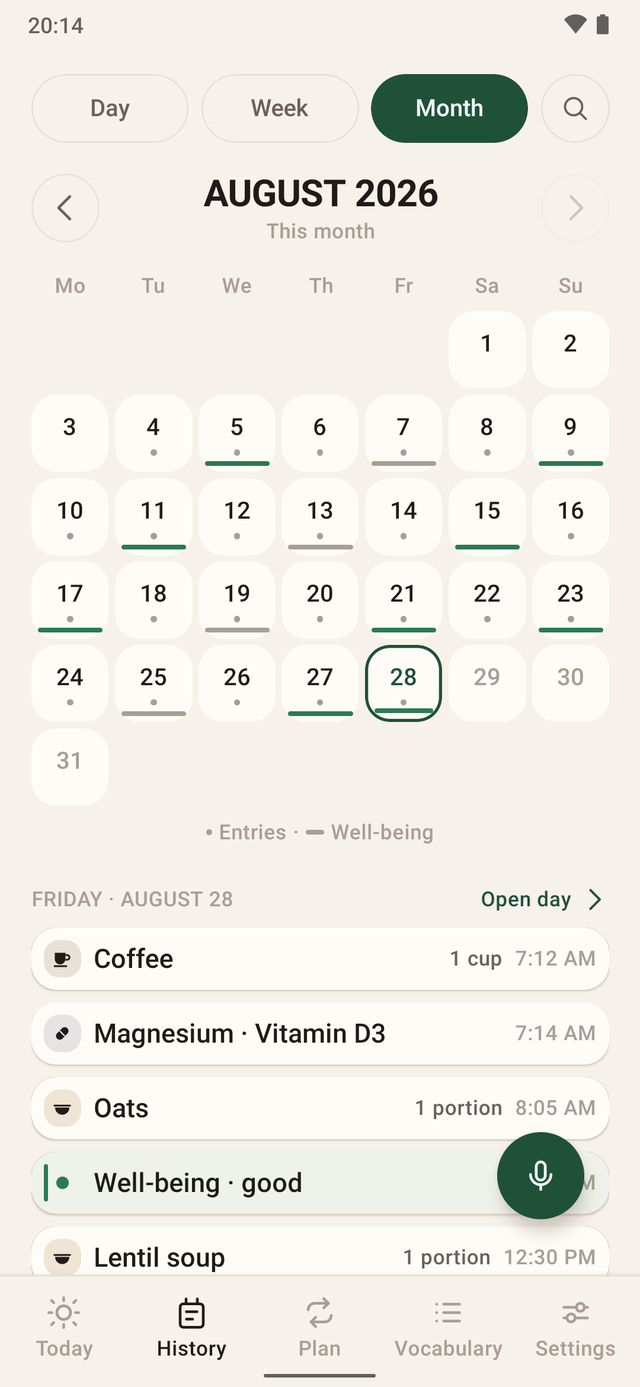
In the month view every day becomes a cell: a dot for the entries, a bar for how you felt. You can search, too — type “magnesium” and you see the days without it.
Vocabulary
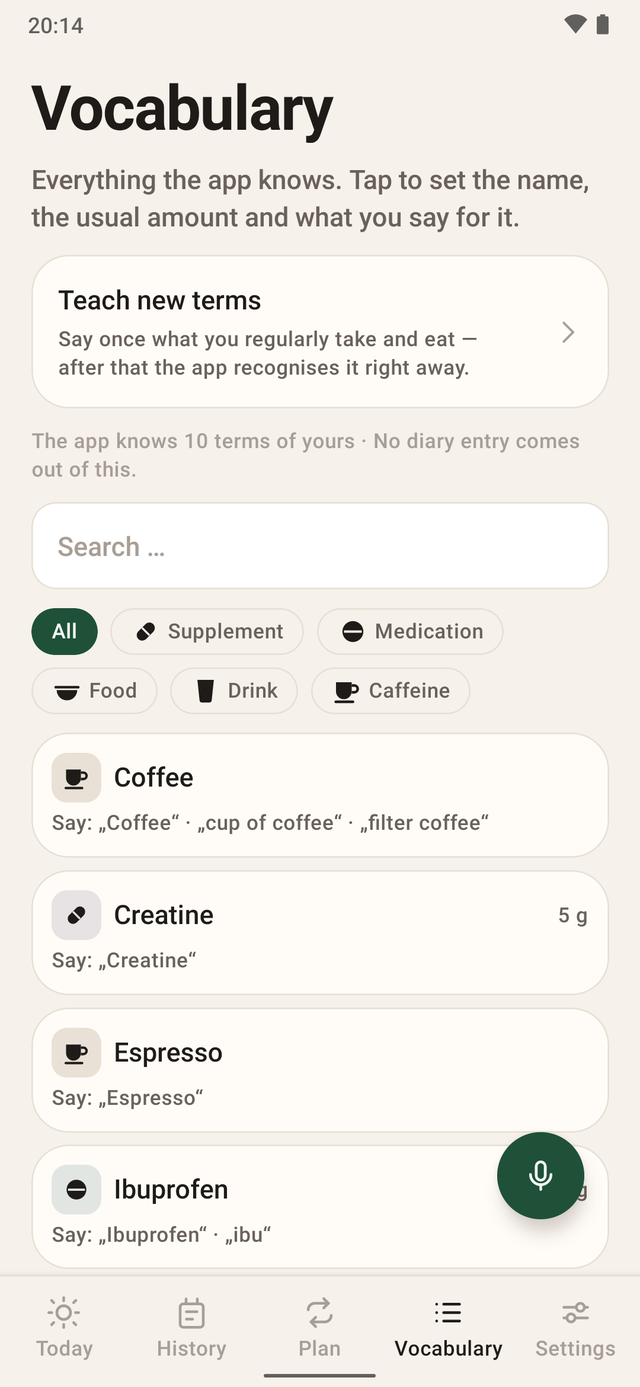
If it does not know a word, it does not guess. It asks: “I don’t know that one yet — what did you take?” Tell it, and next time it knows immediately.
Privacy
Your entries live in a database on this phone. Not on a server, not in an account, not with us. We could not read them if we wanted to.
Where a recording goes
Until 11 Sep 2026 this journey had two more stops: Frankfurt and Paris. Why we tore it down is in the blog.
Effort per entry
It is whether you actually make the entry at a quarter past seven in the morning.
| Step | Typical tracking app | RecTake |
|---|---|---|
| Pick a category | menu, scroll, tap | gone — you say the name |
| Amount and unit | number field, dropdown | “two capsules of 400 milligrams” |
| Time | confirm or correct | already attached |
| Several things at once | one pass per thing | one sentence, several cards |
| An unknown word | create it, fill in a form | the app asks and remembers |
| Where the data sits | usually an account in the cloud | on your phone |
“Typical tracking app” describes the common form-based flow, not one particular product. We compare procedures, not names.
Boundaries
Four refusals that together say more about the app than a feature list would.
You can log medication. That is all the app does with it — no dosing, no indication, no advice.
No daily targets, no points, no streak that breaks. Food is recorded, not judged.
Nothing is shared, nothing is compared. Nobody sees your week but you.
At most it reminds you that nothing has been logged today. It never tells you what to take.
If you are looking for an app that pushes you, you are in the wrong place. This is a notebook that listens.
Frequently asked
If something is missing, it is on the full page — and if it is missing there too, write to us.
Nothing. It stays on the phone. The operating system turns it into text itself — the same recognition that works when you tap the microphone on your keyboard. The recording is discarded afterwards.
Until 11 September 2026 this was different: the recording went to France to be recognised. That path is gone, and with it the consent that used to be needed for it.
To sign in and to buy, yes. Speech recognition itself no longer needs one — it runs on the phone. Reading, searching, typing and editing never went over the network anyway: your entries are here.
No. You can log medication, and that is all the app does with it: no dosage advice, no indication, no medical advice, no diagnosis. What you conclude from your data is your business — and, in case of doubt, that of someone with a licence to practise.
Seven days to try it out, with no limit on recording time. After that RecTake costs 6.99 € a month or 49.99 € a year in Germany — your store shows the price in your currency before you buy. Reading, searching and exporting stay free of the subscription.
It lowers the effort per entry, and that is all it does. At most it reminds you that nothing has been logged today. It will never tell you that you should take something now. It is not a treatment and not a substitute for medical advice.
Get it
RecTake is available for iPhone and Android. You need an account for the subscription — what you write down and what you say stays on the phone.
Speaking needs an iPhone from the XS or XR of 2018, or an Android device from version 13 with the language pack installed. The full overview.
RecTake isn't in the store yet. Leave your address and you'll get exactly one message — the one saying the app is there.